
How to Read Faster and Retain More

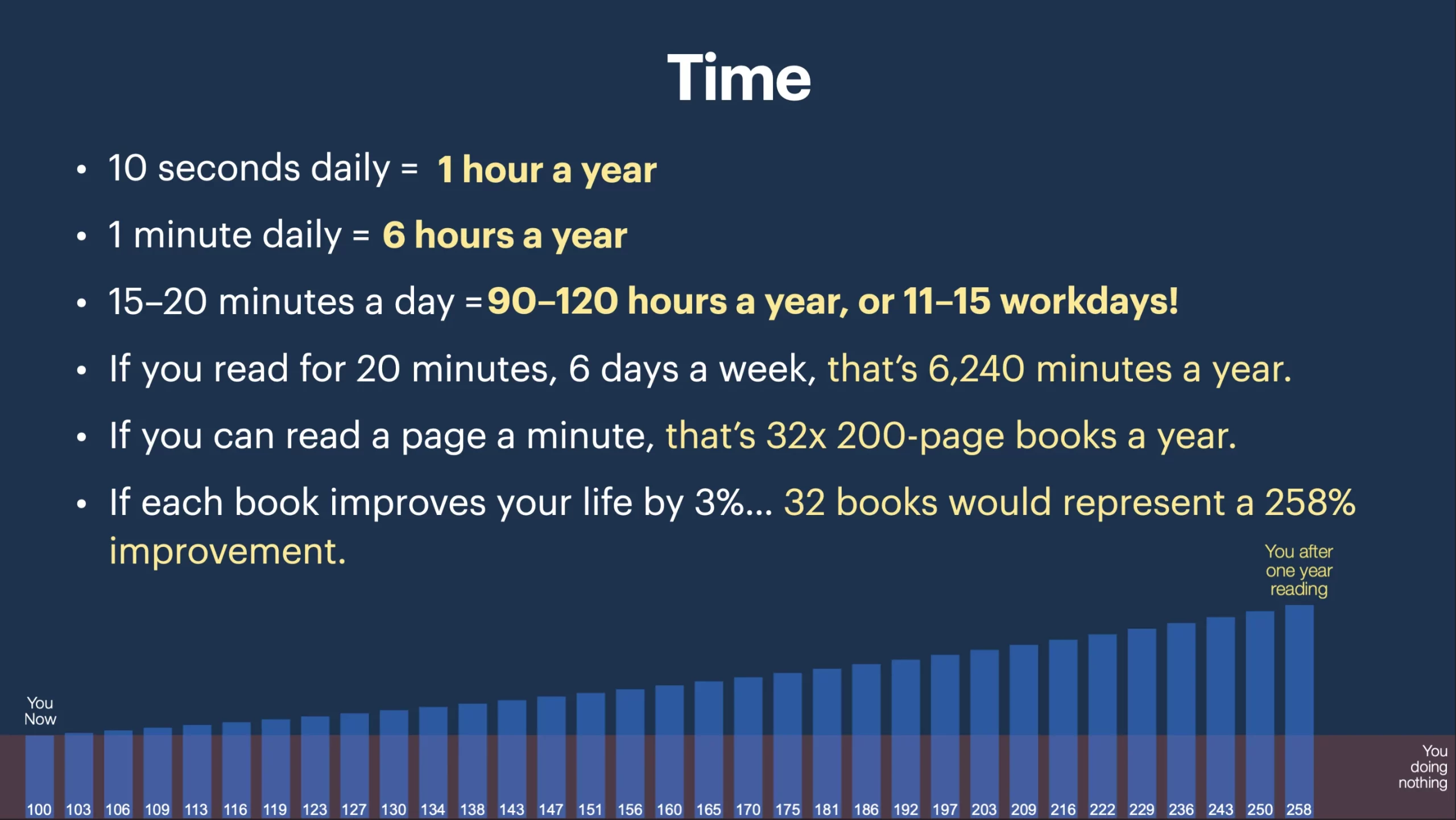
Let’s face it, most new year’s resolutions go before they come because they’re often not all that achievable. In fact, you’re probably thinking right now that reading more than 2–3 books is equally unachievable! It doesn’t have to be that way, though, once you learn the power of small chunks of time.
Spending 20–30 minutes five days a week can add up extremely fast. For example, my wife and I try to read about five days a week. We combined a few lesser-known services and lifehacks to read up to 60 pages every 20–30 minutes. Before you scoff at reading a page every 30 seconds, you must understand how reading works.
When you read a book, your subvocalization is the most significant determining factor in how fast you can read. As its name suggests, subvocalizing silently vocalizes the words you read in your head.
This practice is both good and bad. Good—because that’s what helps you remember what you read. Bad—because that limits the speed at which you can absorb information.
Most speed-reading courses try to teach their students to eliminate subvocalization. The hope is that although your comprehension will initially drop, it might pick back up again. Helpful techniques are usually also taught. You start drawing lines down each side of a page, one-third in from the edge, and then practice reading by glancing at these defined positions. This trains your peripheral vision to catch the rest. These and other techniques take much practice, and mileage often varies. I’m not here to teach you how to speed read the traditional way because it takes time and can be frustrating when retention doesn’t improve. There is one valuable concept here we can steal, though: subvocalization is the primary limiter for speed and comprehension. This can be used to your advantage! Whenever you hear something read out loud or listen to an audiobook, you don’t typically parrot the words in your mind. Subvocalization naturally ceases! As long as you’re paying attention, there is no loss in retention.
Humans can listen far more quickly than you probably ever imagined (up to 750 words per minute, in my experience), and this is the first secret to reading up to 40 books a year. By combining and engaging two senses, you also maximize attention and focus. Combine reading with listening (replacing your subvocalization), and you effectively gain the benefits of speed-reading without sacrificing comprehension. There are several ways to use this information, but here are some ways that work well:
What you’ll need:
1. A willingness to try something new for a few days.
2. A set time (10-30 Minutes a day).
3. A library card from the biggest library or library systems you can get access to.
4. An iOS device (iPhone, iPad) or (Slightly more complicated) Android.
Step 1: Everything can be Audible for free:
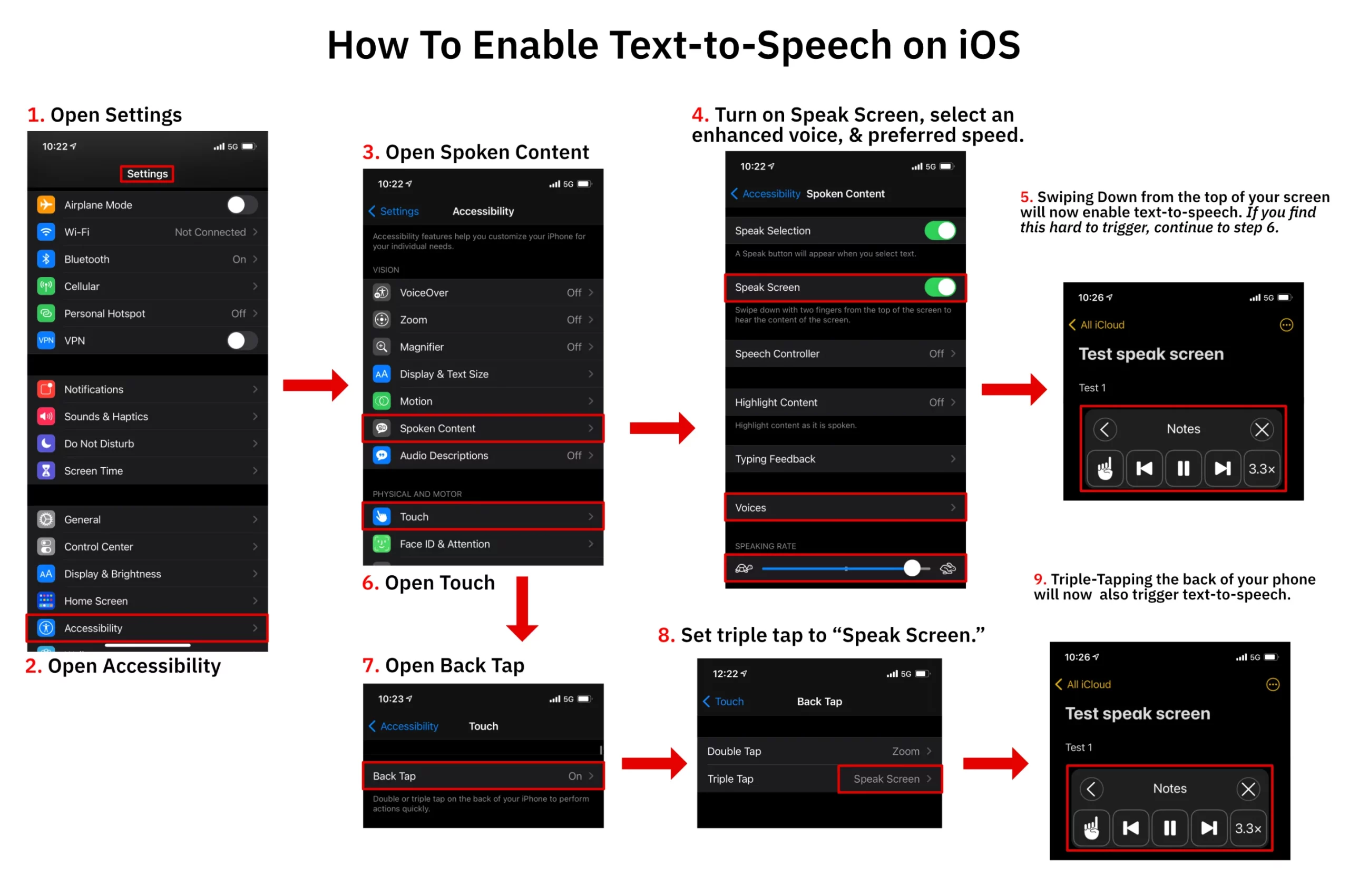
Enable (iOS) System-wide Text to Speech for any app/text (Great for listening to Kindle and Logos or Faithlife books):
- Open Settings
- Navigate to: Accessibility>Spoken Content>
- Enable “Speak Selection”
- Enable “Speak Screen”
- Make sure “highlight content” is off.
- Under “voices”>English> I recommend selecting an (enhanced) version of an English-speaking voice as they sound a lot better than the default option. I recommend the “enhanced” version of the Australian Karen voice (though not premium), as this one tends not to pause as long as others for punctuation.
- Open your eBook reading app of choice.
- Use two fingers to drag down from off the top of the screen as if you are pulling down the notification center to bring up the speech widget and start.
The speech rate can be increased to about 650wpm (4x). At first, this will probably be far too fast for you to understand, but start at the highest rate you can understand and bump it up a little every day or two, and you’ll find you can understand up to 500wpm within a week or two. You will find that you can also suddenly read along much faster than if you were reading unaided. This is because when you hear something being read and read along, what you hear completely replaces your subvocalization.
I don’t have an Android device, but a similar method is explained here. I wouldn’t recommend voiceover for iOS as they do, however.
More polished apps that will read to you while you follow along: Voice Dream Reader, Speechify
Step 2: How to Get Free Books
- Get the Libby app and find the biggest participating library.
- Obtain and then enter your library card number.
- You can “borrow” a digital version of any book in the library system.
- Additional library cards can be entered if you have additional ones from other libraries. Most books can be forwarded to the Kindle App for iOS, Android, or other platforms and last about a month. Any highlights made in the Kindle app while borrowing the book will be saved if you ever borrow it again or purchase it later.
- Bonus tip: If you have a free Goodreads account, the Kindle app will synchronize all your highlights so you can access them whenever you want without owning or re-borrowing the book. Plus, you can keep track of your book goal, see what others are reading, etc.
Step 3: What About Retention?
Long-term retention relies heavily upon reflection and recall. Here’s a helpful technique to maximize retention:
- Summarize chapters in your own words.
- Take time to think about how what you’ve read integrates with what you already know.
- Share what you learned with others. These three tips will shift a book read to a book remembered.
But really? 40 books a year?
- Twenty minutes a day, five days a week, 52 weeks a year = 5,200 minutes.
- At two pages a minute, that’s up to 10,400 pages a year, or a total of 41.6x 250-page books.
- Don’t read that fast? Even if it takes you around 2 minutes a page, you can still pull off about a book a month.